 Exploit Lab
Tutorials
How the app works, screen by screen. Exploit Lab trains one habit: narrowing your opponent's range every time he acts. Here's how a hand goes and what each screen is telling you.
Your first hand
Pick a villain, pick a difficulty, tap Start.
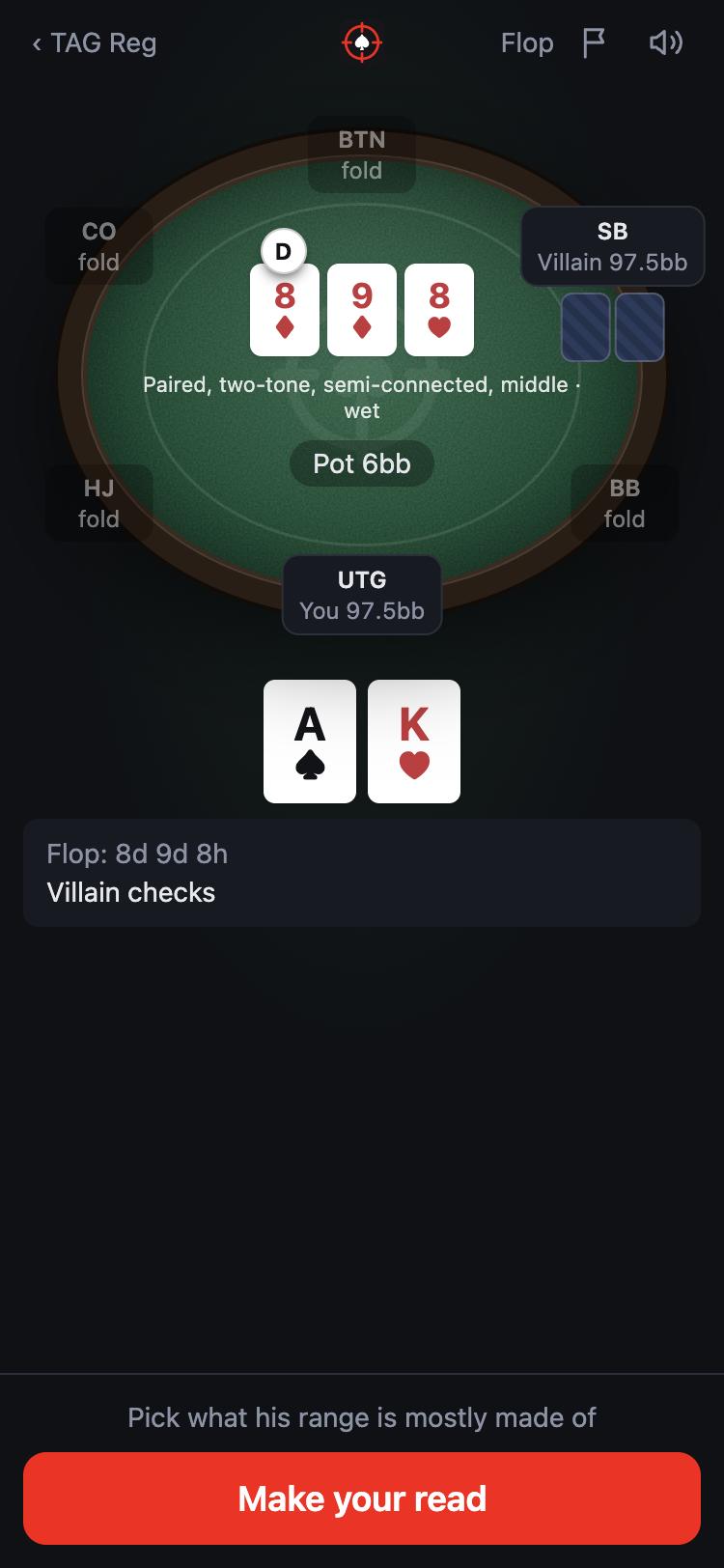
You're the seat marked You; your opponent is marked Villain. The other seats post blinds or fold. The deal plays out on its own until it's your turn, then you choose your action.
Before any cards, the villain could be holding many different hands: that's his range. His starting ranges are under Ranges on the setup screen. Each time he acts, his range narrows to the hands that fit what he did.
When he acts, the button at the bottom says Make your read. That's your cue.
The first time you play, a few short tips walk you through the hand. You can bring them back any time in Settings → Show the tutorial again.
Reading his range
There are three ways to read, from quick to exact. Your difficulty decides which one you use, or pick one under Customize → Read with on the setup screen.
Buckets (Beginner)
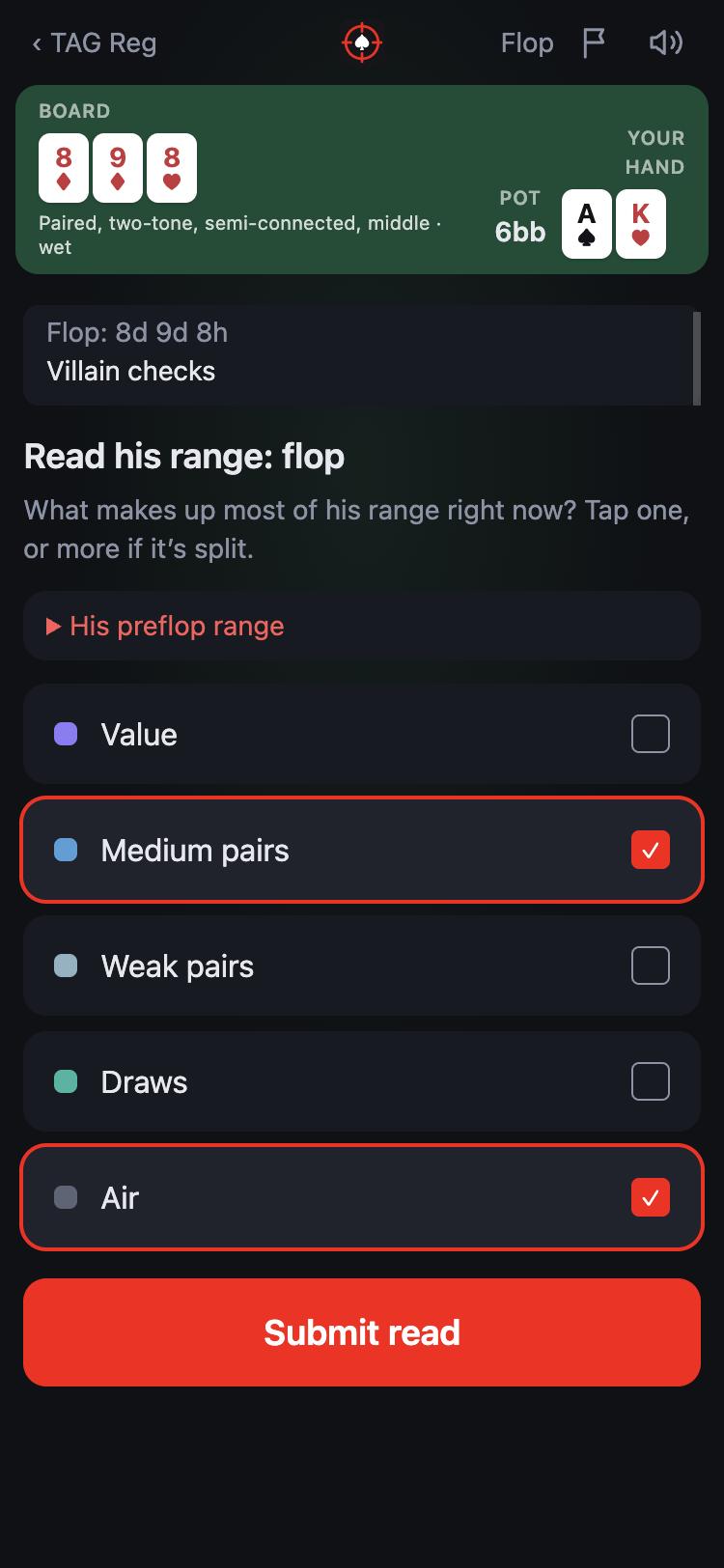
Every hand he could hold falls into one of five kinds: value (strong made hands), medium pairs, weak pairs, draws and air. Pick the kinds that make up most of his range right now. If it's split, pick more than one.
Open His preflop range to look back at what he started with.
Estimate (Grinder)
Give a rough percentage for each of the five kinds, and about how many combos his whole range holds. It's closer to how you'd think it through at the table.
Grid (Pro)
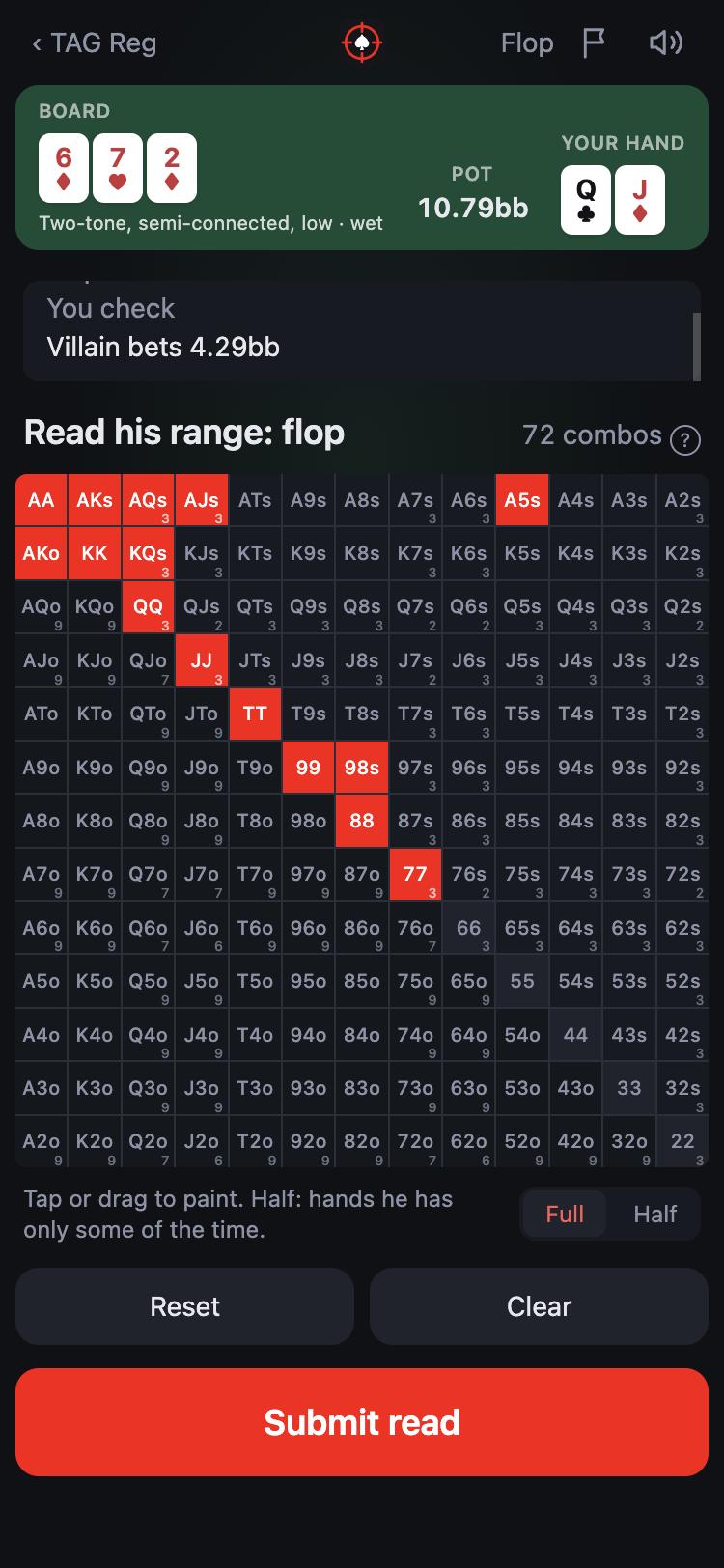
Paint every hand you think he has on the 13×13 chart of starting hands: pairs on the diagonal, suited hands above it, offsuit below. Tap a cell, or drag to paint many.
- Full / Half: Half marks hands he plays this way only some of the time.
- The small number on a cell is how many combos of that hand are still possible once you count the cards you can see. A pair has 6 combos, a suited hand 4 and an offsuit hand 12.
- Reset puts the grid back the way it started; Clear empties it.
The reveal
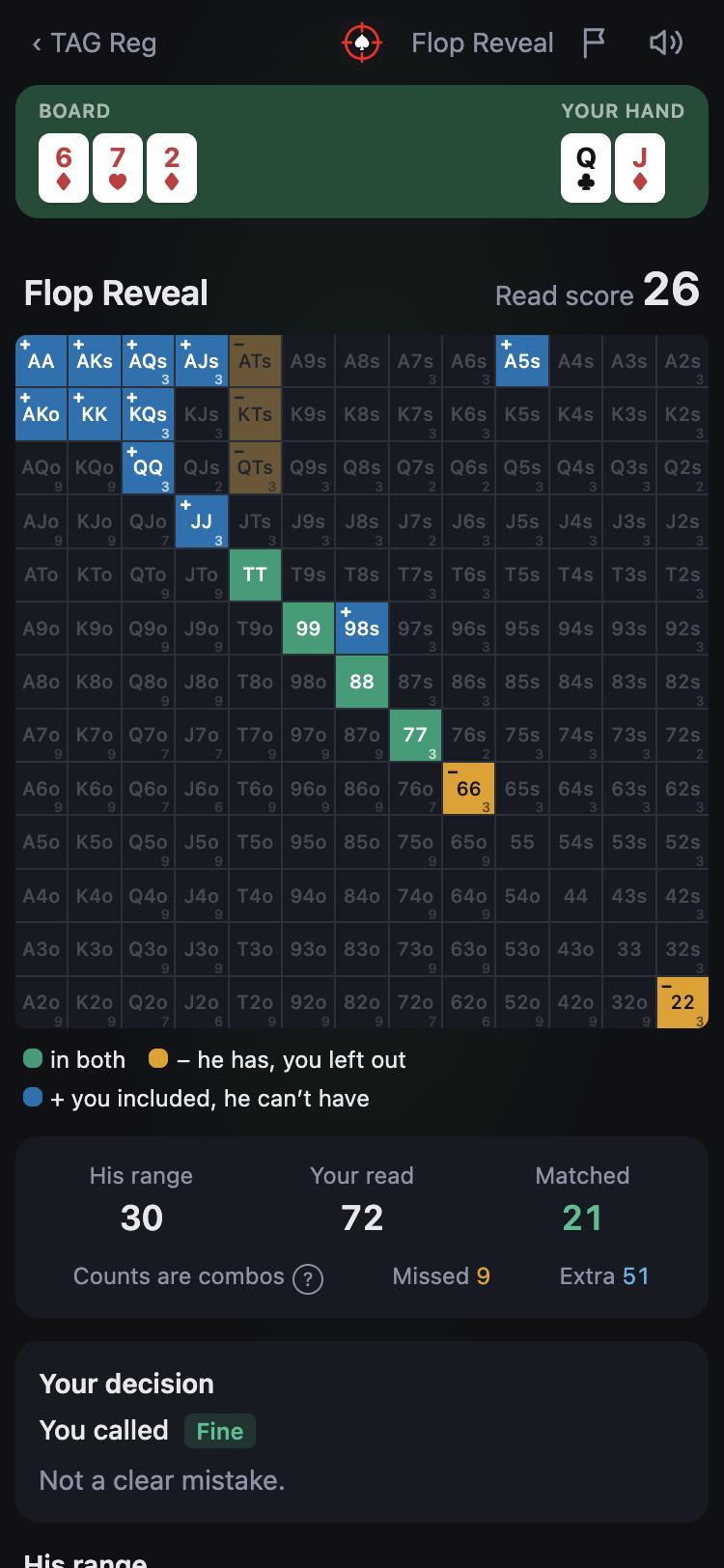
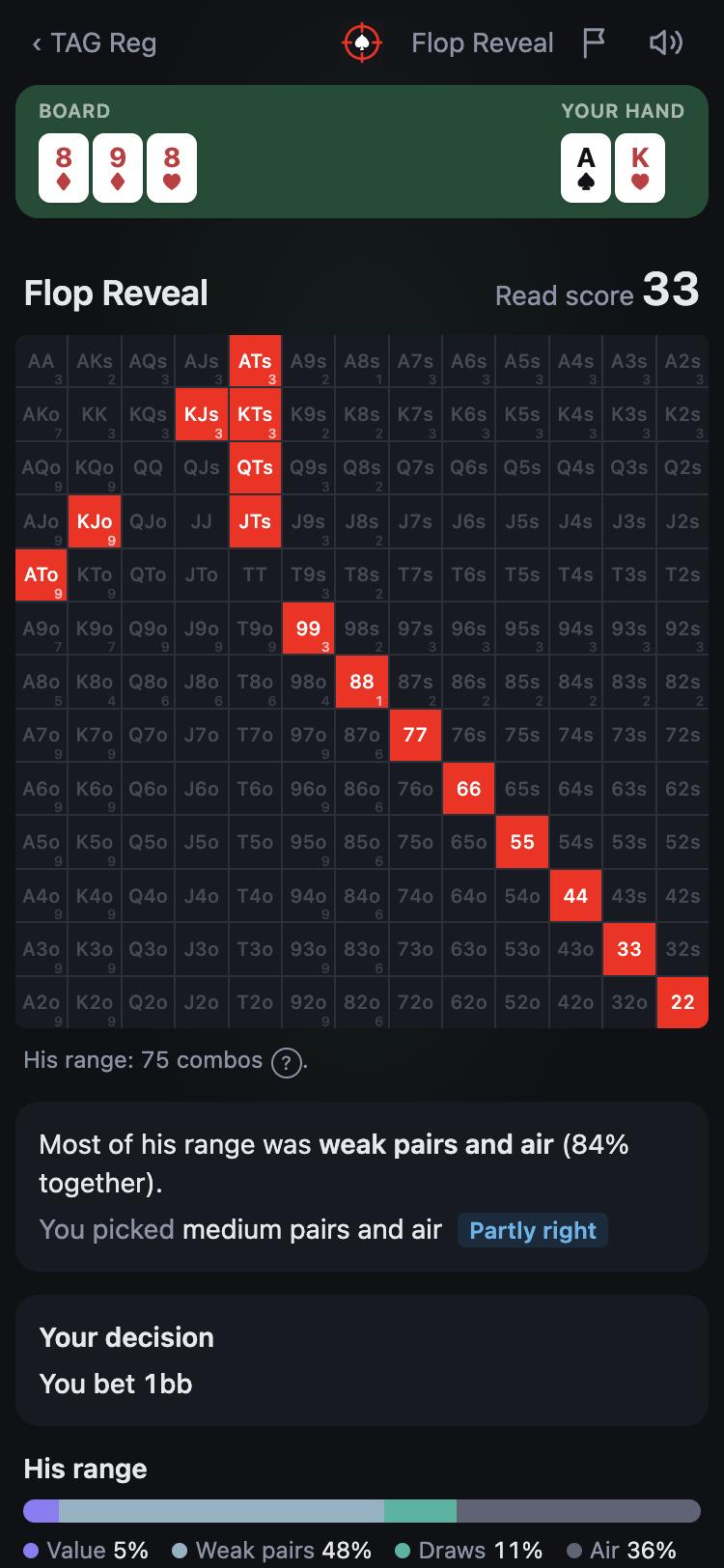
The villain follows known rules, so the app always knows his real range. The reveal shows it and scores your read against it.
On the grid
- Green: in both. You read it and he has it.
- Orange, marked −: he has it and you left it out.
- Blue, marked +: you included it, but he can't have it.
Below the grid you get his range, your read and how many combos matched, missed or were extra. Your read score (0–100) is the overlap between the two: painting too much costs you as much as missing hands.
With buckets
You see his real range on the grid, what most of it was made of and whether your pick was right, partly right or off. The bar at the bottom splits his range into the five kinds.
By default the reveal comes after every street. On Pro it waits for the end of the hand, so you have to keep reading without feedback, like at a real table.
Your decisions
Your actions are scored too, against what he really holds, not just against your own cards.
When you call or fold a bet, the app works out your equity against his real range and the pot odds you were getting. The verdict is Fine, or a clear mistake when you called with less than half the equity you needed or folded with more than double it. Close spots are never called mistakes.
Bets, raises and checks show their numbers but don't get a verdict yet.
How much math you see depends on the Math setting:
- Off: just the verdict.
- Equity: adds how often your hand wins against his range, and what you needed to call.
- Odds + EV: adds the expected value of each choice, your equity when he continues, and how his range would respond to your bet.
Difficulty
Three presets, or open Customize on the setup screen and set each one yourself. Every setting has a ? that explains it.
| Setting | Beginner | Grinder | Pro |
|---|---|---|---|
| Read with | Buckets | Estimate | Grid |
| Villain | Simplified | Mixed | Mixed |
| Board labels | On | Changes | Off |
| Shot clock | Off | 30s | 15s |
| Math | Off | Equity | Odds + EV |
| Reveal | Each street | Each street | End of hand |
- Board labels: short tags under the board, like "Two-tone, connected, wet". Changes only says what a new card changed ("Flush completes"); Off leaves the board to you.
- Shot clock: a time limit for each read and action. When it runs out, whatever is on screen is submitted and marked "timed out".
- Villain: see Simplified and Mixed below.
Villains
Each villain is modeled on a real low-stakes player type: the Nit, the TAG Reg, the LAG Reg, the Calling Station, the Maniac and the Short Stacker. Tap Ranges next to any of them on the setup screen to see his preflop charts.
Simplified and Mixed
- Simplified: he always plays a hand the same way, doing whatever he does most often with it, and always bets the same size. Every hand is either in his range or out of it, so reads are easier.
- Mixed: like real players, he sometimes plays the same hand different ways, for example betting a draw some of the time and checking it the rest. His range has hands that are only partly in it; that's what Half on the grid is for.
Bet sizes
On Mixed, a villain uses several bet sizes. His big bets lean toward strong hands and his small ones toward bluffs, but any size can hold anything. A size shifts the odds; it never gives his hand away.
Handy extras
- History and Stats: every hand you play is saved. History lets you replay any hand. Stats shows your read scores by street, villain and board, your strongest and weakest spots, and your streak.
- Daily goal and streak: play your goal each day (10 hands to start; change it in Settings) to build a streak.
- Hand codes: tap the seed on any summary to copy a code for that exact hand. Anyone can paste it into Settings → Load a hand to play the same hand.
- Report a problem: the flag at the top of the table sends us a note with the hand attached, so we can see exactly what you saw.
- Your account: sign in under Settings with your email to keep your hands and stats on every device. Download my data saves everything as a file; Delete account removes it all.
- Install it: add Exploit Lab to your home screen from your browser's menu and it opens like an app, full screen, even offline.
- On a laptop: the table sits beside your read, and the keyboard works: F to fold, C or K to check or call, B or R to bet or raise, 1–5 for the bet sizes, and Enter to continue.
Ready to try it?
Exploit Lab is in private beta. Join the waitlist and we'll send you an invite.
Join the beta